
I'm a long-term supporter of the Signal messaging application.
Communicating using state-of-the-art encryption while hiding the complexity away is notoriously hard to do, and they manage to do it well, making this amazingly simple for end users.
The signup flow could be improved though, as you are currently required to use the Signal app from a smartphone, which comes with some downsides (the most important one being that you might not want to have signal on your phone as it lowers your overall security).
A tool to signup
"Signal without smartphone" is a tool to help you signup and link with Signal Desktop, with a graphical user interface.
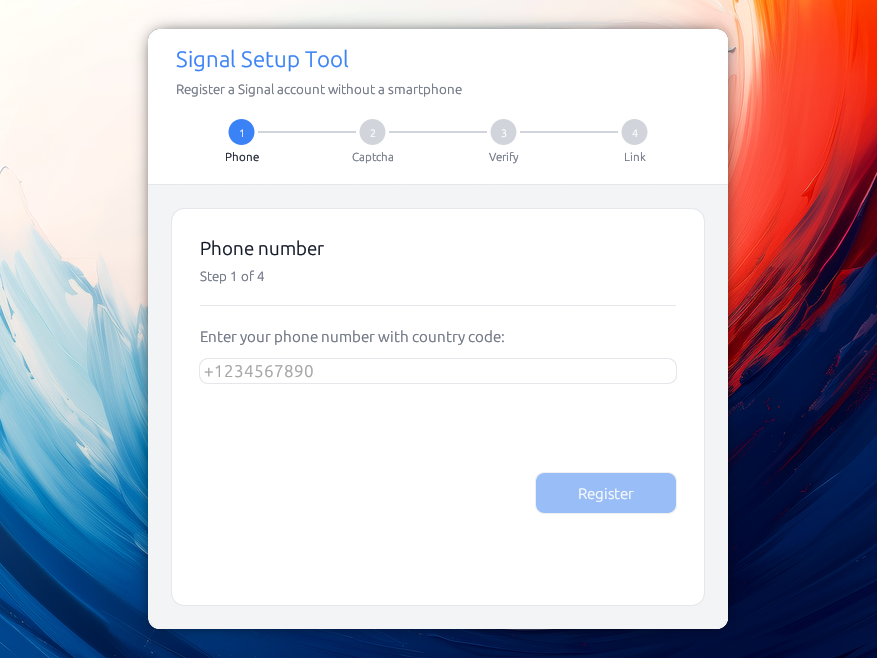
You should be able to use it on Linux, macOS and Windows, to help set things up for you without involving a smartphone.
You can find the project at github.com/almet/signal-without-smartphone¹.
Here is the flow:
- Enter your phone number
- (Optional, depends on Signal's servers) Solve a captcha to prove you're a human
- Paste a code sent to your phone device (via SMS only for now, but I hope to get it to work with voice calls in the future)
- Start Signal Desktop, and capture the QR code
- Paste it back to the app, that will finish the registration.
- XXX
- Profit!
Why a new tool?
Relaxing the smartphone requirement has the following benefits:
-
Don't compromise the security of your messages with a smartphone
The security of your signal conversations is as low as the security of the devices on which it is installed, and so not having a smartphone holding your messages can be a good idea, depending on your threat model:
If your device is lost or stolen when it’s not locked with your passcode, of course someone could read the messages on it. Likewise, law enforcement entities are known to use forensic tools to break into seized devices, making it possible to read anything on the device, including your messages.
-
You might just not have a smartphone, and would still like to use Signal
-
You might want to register multiple Signal accounts.
Right now, Signal is thought with "one account per device" inmind. If you need to handle multiple Signal accounts, you need to find other ways in. While there are mitigations around this (thanks, multiple user accounts on GrapheneOS!), they are not always available.
Existing hacks
Until now, I've been using signal-cli, but it's actually quite involved to install (it requires a Java runtime), and the process involves decoding a QR code yourself, etc. It works, but it's for technical folks.
I've done that multiple times, and I'm grateful this is possible at all. The "Signal without smartphone" tool is mainly relaxing the need to have a technical person around.
Under the hood
It's been a while since I wanted to have a look at the Signal protocol more closely, and that was it! It's a cool but involved protocol. I learned quite a few things along the way, from how they pin certificates to what are Kyber keys (ML-KEM).
As a result, I now have a rust crate that's able to do the registration, without needing the JVM. I believe it's a huge win :-)
I'm still learning rust, and I might have made mistakes. If you find some, please report them to me, or even better, don't hesitate to contribute!
The code uses two crates: one with the GUI bits and one for the crypto and http calls.
I'm most impressed by egui, because I believe the produced application look slick and I've been able to compile a simple binary of less than 10MiB, on each of the targeted platforms.
Everything is a bit fresh, so take it with a grain of salt. You can find more information on the README.md file in the repository.
Packaging for macOS and Windows
Packaging for macOS and Windows is costly: Apple requires you to pay $90 per year for an apple developer account, and it's even more for Windows.
And so… the binaries aren't currently signed properly. I tried to provide instructions on how to circumvent the warnings you get when installing, but until I'm able to sign for these platforms, they will continue to warn you.
If the tool gets some traction, I might end up just subscribing, but let's see if this is actually used first!
¹ Why Github?
I don't really like Github: it's proprietary, Microsoft owned, and they push a lot of AI to their users, and they train their models on the code hosted there (unless you opt out).
I'm mainly using it to get access to macOS and Windows machines, in order to build and release the binaries. Alternatives don't provide runners for these platforms, unless I missed something, and so… 🤷🏼♂️
Anyway, that was a fun journey!