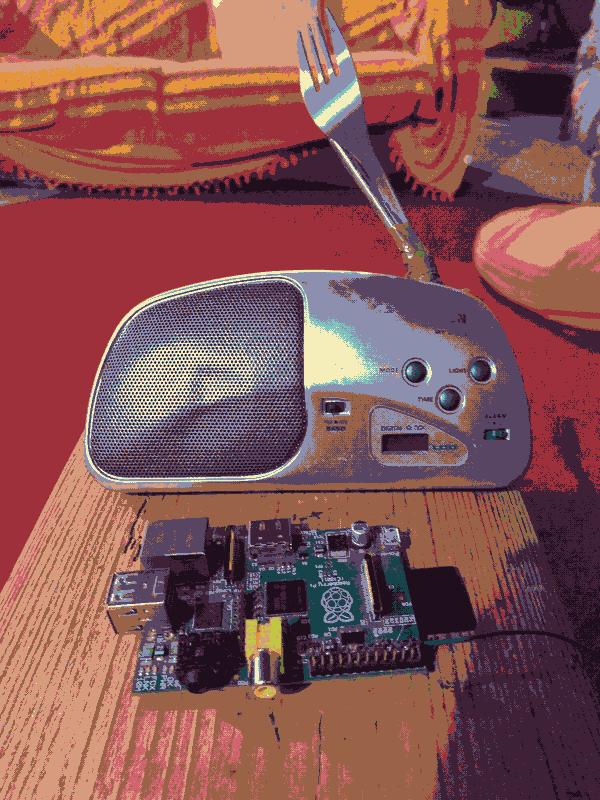
For the theatre show "Nicole dans la place" — a one-person clown show, talking about loneliness, friendship and society — we wanted to have a radio able receive a specific piece of music.
We used to send the music to the front speakers, but at some point realized it might be possible to use the actual radio as a receiver. Turns out it works great!
Doing it over real FM gives us multiple benefits, such as being able to play with the analog frequency gear and with the emitter and receipter antennas to make the sound clear or noisy, depending on the effect we wanted to achieve. Yay, parasites!
This was the perfect occasion to undust the Raspberry Pi that was sitting un-used almost since I bought it for 20€ when it came out in 2011.
I found pifmrds, an awesome project that's able to emmit FM using pulse-width modulation on the Pi. It's even capable of transmitting text over RDS (not useful here but… fun fact!)
It uses the pi GPIO 4 (pin 7) as the transmitter. Adding a 20cm electric wire on that pin made it a great antenna, and even without it you're able to emit in the room, which for us was enough.
Here is a short tutorial on how to install this project in the raspberry-pi, and have a sound play on repeat on a frequency of your choosing, so we just have to turn the raspberry-pi on and wait for the music to flow.
Flashing the pi
I installed Debian bullseye on it, because it's known to work with pi_fm_rds. Basically I downloaded an image and put in the SD card.
Then, for convenience, I connected the pi with a network adapter, and made it run an ssh server for me. You can do without it, but it was nice to do some experiments.
Building pi_fm_rds
After downloading a few dependencies, it was just a make command away!
# on the pi
sudo apt-get update
sudo apt-get install -y git build-essential libsndfile1-dev

git clone https://github.com/ChristopheJacquet/PiFmRds.git
cd PiFmRds/src
make

# Copy it to a location where it can be found
sudo cp pi_fm_rds /usr/local/bin/pi_fm_rds
sudo chmod 755 /usr/local/bin/pi_fm_rds
Wait, it's not playing at the right pace!
To avoid un-necessary decoding, I used a .wav file.
But when playing, the sound was playing at a quarter of the speed I wanted. I changed a few things to make sure it's mono instead of stereo, increase the output volume and pass the proper bitrate.
(see below for the command that does everything at once)
But, the volume is too quiet
Also, when it was playing, even with the volume gear cranked to the max, I couldn't here much, and it wasn't enough for the audience to hear, and so I had to normalize it:
Of course, I used the swiss-army-knife for audio and video, ffmpeg:
ffmpeg -i vivaldi.wav \
  -af "loudnorm=I=-10:TP=-1.0:LRA=11,alimiter=limit=0.97" \
  -ac 1 -ar 44100 -c:a pcm_s16le \
  vivaldi-mono-normalized.wav
Don't be afraid, here is what this command does:
loudnorm=I=-10sets the target loudness to -10dbTP=-1.0+alimiteravoid clipping when normalizing-ac 1converts to mono-ar 44100 -c:a pcm_s16leto have the proper bitrate.
Play on repeat
Here is a little script that reads the values in /etc/radio.ini to stream the sound on repeat.
Here is the ini file:
file = /home/pi/vivaldi-normalized.wav
frequency = 100.0
Then, a small script reads that config and feeds the .wav to pi_fm_rds, looping forever.
One subtlety: pi_fm_rds defaults to a 22050 Hz sample rate. That's the reason why the 44100 Hz was playing at half speed, and so the script reads the real rate from the .wav file and passes it along.
Here is /usr/local/bin/play-radio.py, which really is a wrapper around the pi_fm_rds -freq 44100 -audio audio_file command.
#!/usr/bin/env python3
import configparser
import os
import sys
import wave


def read_config(path):
    """Read the flat (section-less) radio.ini with configparser."""
    parser = configparser.ConfigParser()
    with open(path) as f:
        # configparser needs a section header; the ini has none, so add one.
        parser.read_string("[radio]\n" + f.read())
    return parser["radio"]


def main():
    config = sys.argv[1] if len(sys.argv) > 1 else "/etc/radio.ini"

    if not os.path.isfile(config):
        sys.exit(f"Error: config file not found: {config}")

    settings = read_config(config)
    audio_file = settings.get("file")
    freq = settings.get("frequency")

    if not audio_file:
        sys.exit(f"Error: 'file' not set in {config}")
    if not freq:
        sys.exit(f"Error: 'frequency' not set in {config}")
    if not os.path.isfile(audio_file):
        sys.exit(f"Error: audio file not found: {audio_file}")

    try:
        with wave.open(audio_file, "rb") as w:
            rate = w.getframerate()
    except (wave.Error, OSError):
        print("Warning: could not read WAV sample rate; defaulting to 22050",
              file=sys.stderr)
        rate = 22050

    print(f"Broadcasting '{audio_file}' on {freq} MHz at {rate} Hz (looping)",
          flush=True)

    env = {**os.environ, "PIFM_SAMPLERATE": str(rate)}
    cmd = ["pi_fm_rds", "-freq", freq, "-audio", audio_file]

    # pi_fm_rds exits when the file ends; restart it to loop forever.
    while True:
        os.spawnvpe(os.P_WAIT, cmd[0], cmd, env)


if __name__ == "__main__":
    main()
Make it executable: sudo chmod +x /usr/local/bin/play-radio.py.
Stream at startup
Okay, nice, we are able to transmit the sound, and the receipter is receiving properly. Now, we want to have something that does that automatically at startup.
To run it at boot I used a systemd service. It needs to run as root, because the GPIO direct memory access access requires it.
Here is the /etc/systemd/system/radio.service file:
[Unit]
Description=FM radio auto-play
After=network.target

[Service]
Type=simple
ExecStart=/usr/local/bin/play-radio.py /etc/radio.ini
Restart=on-failure
RestartSec=5

[Install]
WantedBy=multi-user.target
Then enable and start it:
sudo systemctl daemon-reload
sudo systemctl enable radio.service
sudo systemctl start radio.service